
Make it in the Bulin 47 AI app now
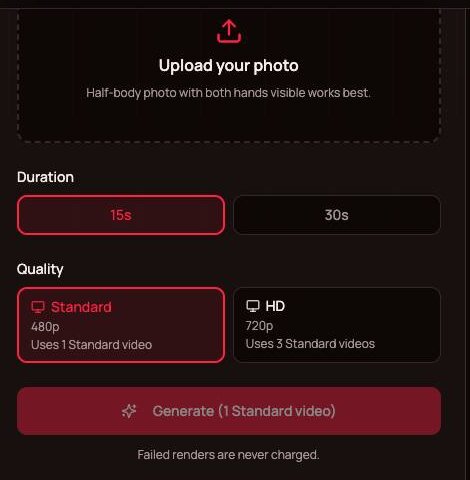
Failed renders are never charged.
Upload your photo on the left and click Generate.
Why the Bulin 47 AI app runs in your browser
The Bulin 47 AI app lives at bulin47.ai, so there is nothing to look for in an app store and nothing to update. A web page can do everything this video needs: pick a photo from your camera roll, send it off for rendering, and hand back an MP4 you can save. It is the same Bulin 47 AI generator you get on a laptop, laid out for a phone screen. Sign in with Google on whichever device you have in your hand and you are ready to go.
- No downloadNothing to install, no storage used, no permissions to grant beyond picking one photo.
- On iPhoneOpen bulin47.ai in Safari or any other browser. Pick the photo from your library and save the MP4 back to the phone.
- On AndroidOpen it in Chrome or any other browser. Upload from your gallery and download the finished MP4 to your phone.
Using the Bulin 47 AI app on iPhone and Android
The whole run, from photo to post, without leaving your phone. For the same steps on any device, read how to make a Bulin 47 AI video.
Step 1: open the site and sign in
Type bulin47.ai into your phone browser to open the Bulin 47 AI app, and sign in with Google. Before you pick a plan, watch the sample videos on the page with the sound on, so you know exactly what you will get. Tip: add the page to your home screen, and next time it opens with one tap like any installed app, minus the store and the install.
Step 2: pick a photo from your camera roll
Tap the upload box and choose a photo of one person with the face clearly visible. A half-body shot with both hands visible, taken in good light, works best. You can also take a new one on the spot: stand facing a window, look at the camera, keep sunglasses off. Then choose 15 or 30 seconds and Standard or HD.
Step 3: wait, save and post
A video takes about 5 to 10 minutes, whichever length you pick. The rendering happens on our side, so your battery is not doing the work. When it is done, download the MP4 to your phone and post it to TikTok, Reels or Shorts straight from your gallery.
Bulin 47 AI app vs other phone routes
Phones are where this trend gets made, and there are three common ways to do it. The Bulin 47 CapCut page compares the template route in detail.
CapCut templates
Template creators publish Bulin 47 templates inside the CapCut app. Quality varies from one template to the next, and most use a face overlay or cut-out rather than a full-body replacement.
General AI video apps
Platforms like Higgsfield, Dreamina and Kling can make it too. You bring the reference clip, write a prompt and pick a model, on their own credit plans.
This browser tool
The clip and the original sound are already loaded. You add one photo, with no prompt and no editing, and the whole rapper is replaced.
Phone tips for a better result
Small phone habits that make a cleaner Bulin 47 AI video.
Sharp beats fancy
A steady, in-focus photo matters more than the camera. Wipe the lens and hold still.
Face the light
Stand facing a window or a lamp. Shadows across the face make the likeness weaker.
Half-body framing
Head to waist, with both hands in view, gives the model your face, hair, clothes and hands in one shot.
Switch apps while it renders
The video is made on the server, so you can answer messages while you wait.
Watch it with sound
Play the whole clip with the volume up before sharing, not only the first second.
Only photos you may use
Your own photo, or a friend who said yes. Celebrity and public-figure photos are blocked by the filter.
More guides
What you get, whether anything is free, and every step in detail.

Bulin 47 AI app questions
Do I need to install a Bulin 47 AI app?
No, the Bulin 47 AI app runs in your browser at bulin47.ai. Open it in Safari on iPhone or in Chrome on Android, sign in with Google and upload a photo. It does the same job as an installed app, without taking up storage or asking for updates.
Is the Bulin 47 AI app free?
No, there is no free trial and nothing is added to new accounts, because every video uses real rendering time. You can watch the sample videos before buying, and a render that fails or gets filtered is never charged. Why it works this way, and the cheapest way to one video, is explained on the Bulin 47 AI free page.
Does it work on Android?
Yes. It works in Chrome and other Android browsers exactly as it does on a laptop. Upload a photo from your gallery, pick 15 or 30 seconds and Standard or HD, and download the MP4 to your phone when it is ready. There is nothing to install and nothing to keep updated.
Does it work on iPhone?
Yes, it runs in Safari and in other iPhone browsers. Choose a photo from your library or take a new one, select the length, and wait about 5 to 10 minutes. Then download the MP4 and post it to TikTok, Instagram or YouTube from your phone, like any other video.
Can I leave the page while it renders?
Yes, the Bulin 47 AI app renders the video on our servers, not on your phone. You can switch to another app and come back to the page later to download the result. Expect about 5 to 10 minutes per video, a little longer at busy times.
What does a plan cost on mobile?
Plans are the same on every device: monthly or yearly subscriptions that count Standard videos, with yearly costing less per video. A full 30-second video or a 15-second HD video uses 3, a full 30-second HD video 6. See Bulin 47 AI pricing for the current plans; failed renders are never charged.
Whose photos can I use?
Yours, or a friend's if they said yes. The filter turns away photos of celebrities and public figures, and you pay nothing for a render it stops. Pets and cartoon characters can work, but the results are less predictable than with a clear photo of a real person.
Is this an official Bulin 47 app?
No. Bulin 47 AI is an independent, fan-made tool and has no affiliation with Bulin 47, Kevin Wai or their labels. It is a browser tool for fans who want to join the meme with their own photo. The official music from the two of them is the song "Dame Hombro", released on 8 October.
The Bulin 47 AI app is already on your phone
One photo, one tap, about 5 to 10 minutes. Watch the samples, then make yours.